Fleet Control · Excel fleet management template · 2026 edition

Find the vehicle that is quietly losing you money

Trips, fuel, maintenance, tires and documents in one Excel file that shows the profit of every vehicle and warns you before something expires. No software subscription.

1:15 video with the real spreadsheet

Result 2026249,977sample fleet, Jan–Nov
Fleet efficiency2.90 km/Ldistance per fuel unit
Active alerts41 expired · 1 expiring · 2 services
  • No monthly fees
  • Instant download
  • 7-day guarantee
  • Excel on Windows or Mac
Built for fleets inFreight & haulageDistribution & deliveryConstructionField servicesAgribusinessCorporate fleets
Sound familiar?

Running a fleet without a system costs money every single day

If you manage trucks, vans or pickups, you have probably lived at least three of these. Here is what each one looks like with Fleet Control.

Fuel

The problemFuel is your biggest bill, and nobody can tell you which truck or which driver is burning too much.

With Fleet ControlEvery fill-up is tied to a trip, a vehicle and a driver. Distance per fuel unit shows up by vehicle, by driver and for the whole fleet.

Maintenance

The problemOil changes and inspections live in someone's head. A skipped service turns into a breakdown, a tow and a lost load.

With Fleet ControlSchedule each service by date or by odometer. The spreadsheet counts the days or distance left and marks what is late in red.

Tires

The problemTires cost a fortune and vanish into the yard: nobody knows which tire is on which vehicle or how much life it has left.

With Fleet ControlLog every tire move (fit, remove, scrap or service) with the odometer. See the tires in use and when each one is due for a change.

FitTire 1 → FLT-101at 5,000
RemoveTire 2 ← FLT-102at 24,000
ScrapTire 3life 2,500
Change dueTire 1at 10,000

Documents

The problemA registration, an insurance policy or a driver's license expires and you only find out at a roadside check, with a fine.

With Fleet ControlExpiration dates for vehicles and drivers with automatic status (On time, Expiring soon, Late) and a counter on the dashboard.

Trips & freight

The problemFreight comes in; fuel, tolls and per diems go out. You never really know if a trip made money or lost it.

With Fleet ControlCargo, fueling and costs link to the trip code. The trip list shows what is in transit and every trip carries its freight and costs.

Profit per vehicle

The problemAt the end of the month there is money in the account, but no idea which vehicle carried the profit and which one ate it.

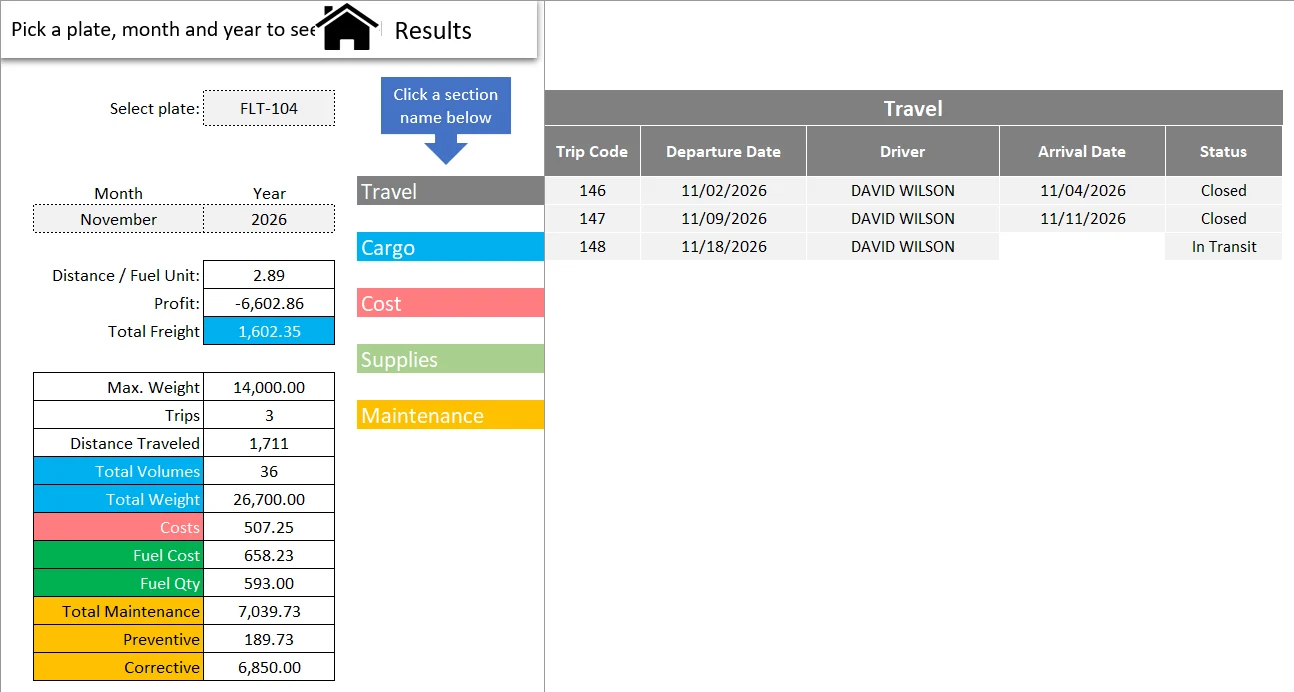
With Fleet ControlPick a plate and a month: the vehicle history crosses freight, fuel, costs and maintenance and shows the profit or the loss.

It's not a lack of effort. It's the lack of one place where the numbers connect: every trip to its vehicle, every gallon or liter to its driver, every service and every tire to its odometer.

Fix this in my fleet

What you will know

The answers your operation needs, without building a single formula

Which vehicle is losing money?

The vehicle history crosses freight, fuel, costs and maintenance for any plate and month.

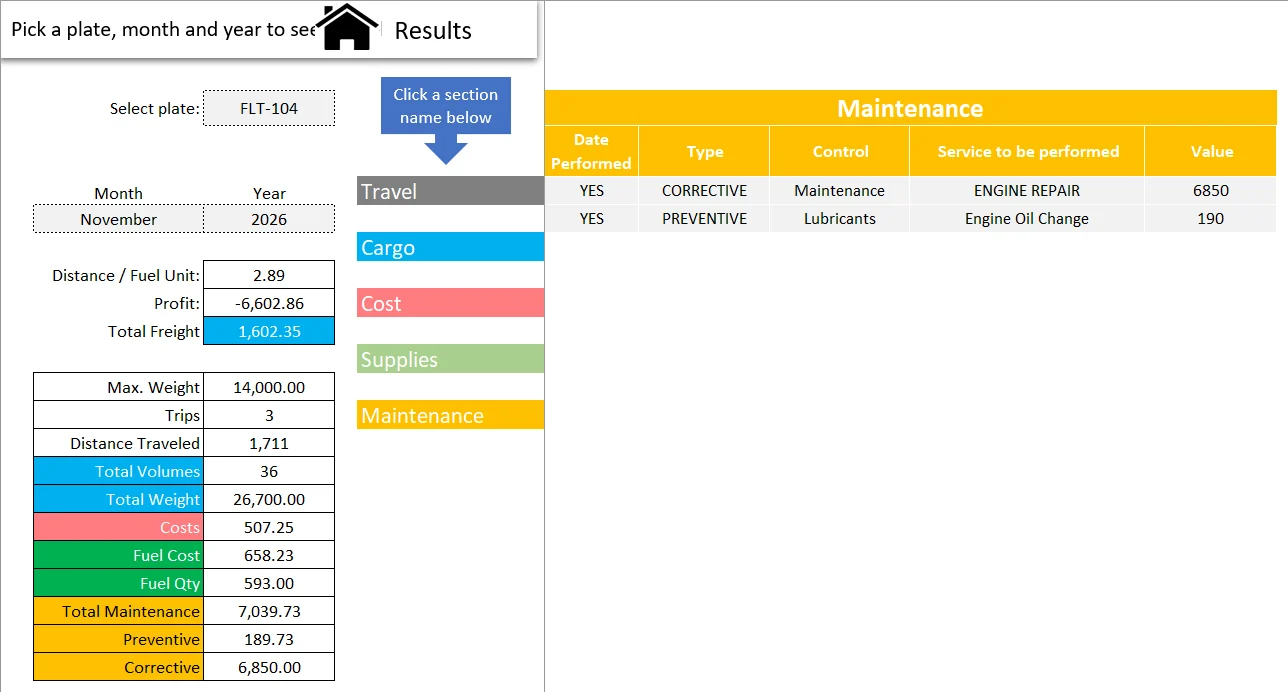
FLT-104 in November: −6,602.86 after a 6,850 engine repair

How efficient is each vehicle?

Distance per fuel unit by vehicle, by driver and for the whole fleet, updated with every fill-up.

Fleet: 2.90 km/L · FLT-102: 2.48 km/L

What is expired or overdue?

The dashboard counts expired vehicle and driver documents and late services, by date or by odometer.

1 document expired · 1 expiring · 2 late services

How much did each month leave?

The annual analysis shows fuel, maintenance, other costs, freight and result from January to December.

October: 40,061 in freight · 28,603 result

Figures calculated by the spreadsheet with a sample fleet of 8 vehicles, January to November 2026.

One sample fleet, almost a full year inside the spreadsheet

8vehicles
296trips recorded
187,961kilometers driven
64,838liters of fuel
Your fleet

Every vehicle with its result, its fuel efficiency and its alerts

This is how the sample fleet looks in the spreadsheet: what each vehicle billed, what it spent and what needs attention.

OperatingSemi-Trailer
FLT-101Freightliner 2022
Result
63,185
km/L
2.56
Km
38,109
JMJames Miller37 trips
Service overdueSemi-Trailer
FLT-102Kenworth 2021
Result
55,033
km/L
2.48
Km
35,278
RDRobert Davis35 trips
Document expiringSemi-Trailer
FLT-103Volvo 2023
Result
62,946
km/L
2.74
Km
36,589
MBMichael Brown37 trips
Document expiredTruck
FLT-104International 2014
Result
6,792
km/L
3.00
Km
19,858
DWDavid Wilson39 trips
Service overdueTandem Truck
FLT-105Mack 2019
Result
31,505
km/L
3.02
Km
24,317
DTDaniel Taylor36 trips
OperatingTruck
FLT-106Peterbilt 2020
Result
22,868
km/L
3.36
Km
19,128
KMKevin Moore37 trips
OperatingLight Truck
FLT-107Isuzu 2022
Result
7,342
km/L
6.41
Km
9,264
JMJames Miller36 trips
In transitVan
FLT-108Ford 2023
Result
306
km/L
8.81
Km
5,418
RDRobert Davis39 trips

Result = freight − fuel − other costs − maintenance. Sample fleet recorded in kilometers and liters; the spreadsheet works the same way in miles and gallons. FLT-104 shows a loss in November after a 6,850 engine repair.

Inside the spreadsheet

A complete fleet management system, inside Excel

Record once and the information shows up on the dashboard, the annual analysis and every report.

01 / 06 · Dashboard

Your whole fleet on one screen

Distance, fuel use, maintenance totals, vehicles and tires in use, document and service delays, cost vs freight by month and cost by type.

  • Year selector
  • Document and maintenance alerts
  • Cost vs freight, month by month
02 / 06 · Annual analysis

Each month's result, ready for your meeting

Fuel used and spent, preventive and corrective maintenance, other costs, distance, trips, freight and result from January to December.

  • Filter by year, plate and driver
  • Distance per fuel unit each month
  • Automatic yearly totals
03 / 06 · Maintenance

Services scheduled before the breakdown

Schedule each service by date or by odometer. The template counts the days or distance left and flags what is late.

  • Control by date or distance
  • Preventive and corrective
  • Status: scheduled, realized or late
04 / 06 · Trips

Every trip with its cost and its freight

Record departure, arrival, vehicle and driver. Cargo, fueling and costs link to the trip code.

  • Trips in transit and closed
  • Cargo capacity used
  • Profit or loss per trip
05 / 06 · Fueling

Every gallon or liter recorded and compared

Fill-ups by trip with station, quantity and value, so fuel use that is out of the ordinary stands out.

  • Quantity and value per fill-up
  • Efficiency by vehicle and driver
  • Fuel stations
06 / 06 · Vehicles

Every vehicle with its documents under control

Type, plate, make, year, capacity, insurance, registration and documentation expiration, with automatic status.

  • Up to 150 vehicles
  • On time, expiring soon or late
  • Starting and current odometer
Vehicle history

Everything that happened to each plate

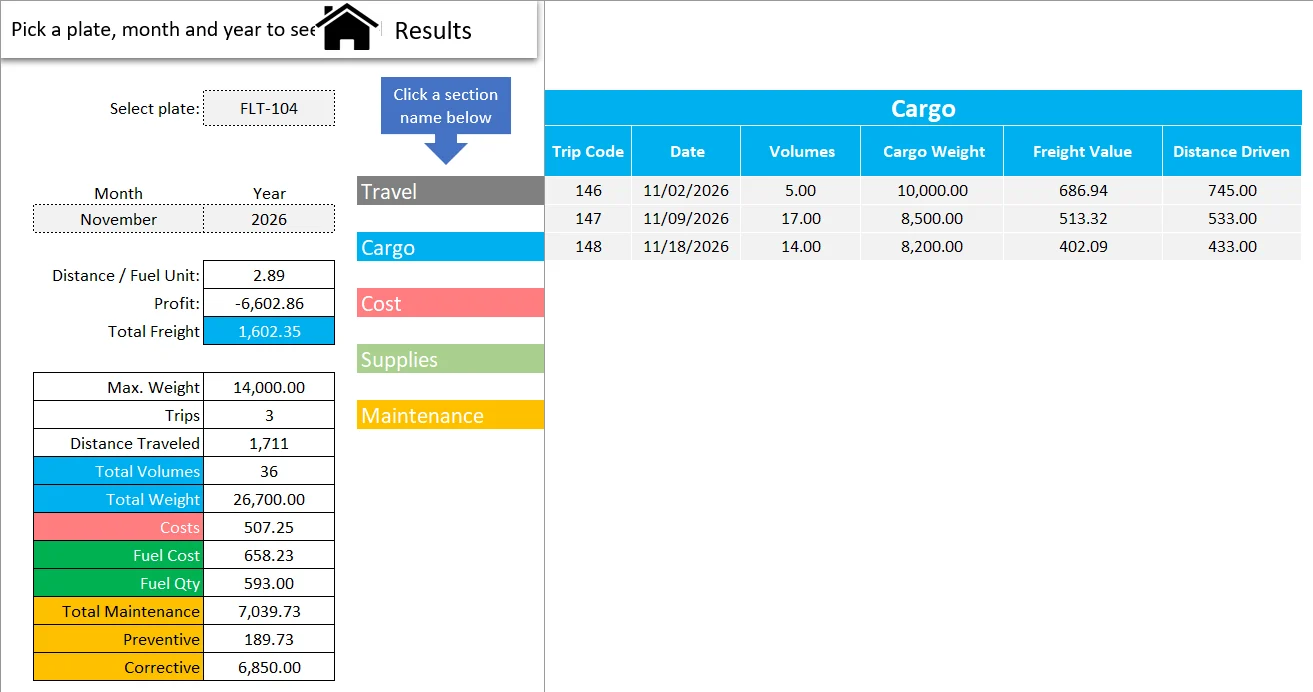
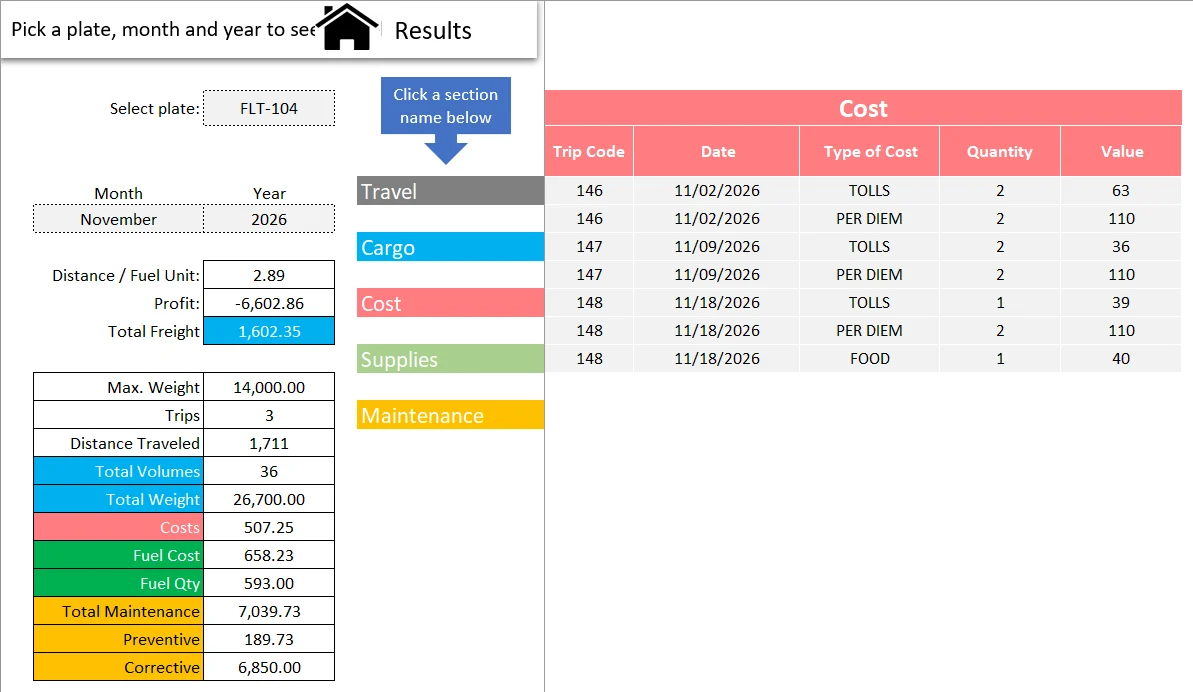
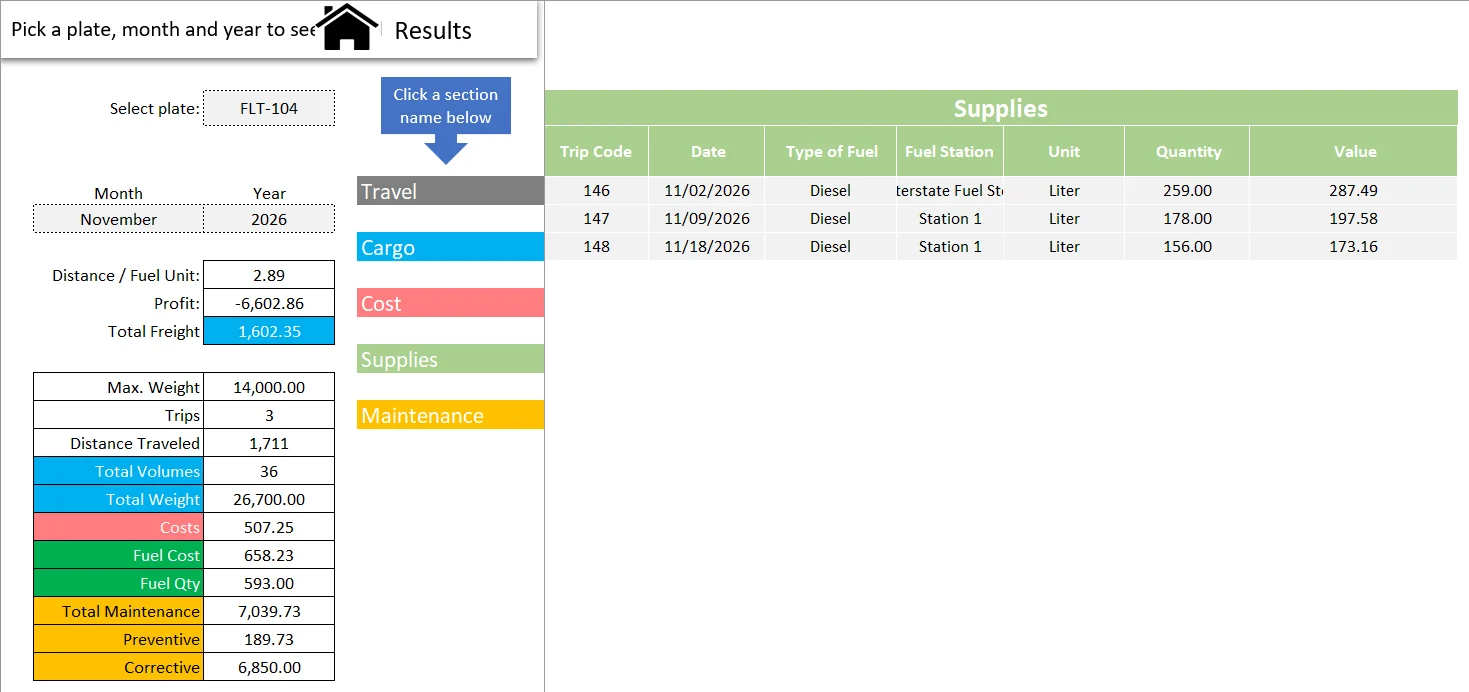
Pick a plate, a month and a year, and the spreadsheet opens five reports for that vehicle. Keep scrolling to see each one.

  1. 01

    Travel

    All the trips of the plate: departure, driver, arrival and status.

  2. 02

    Cargo

    Volumes, weight, freight value and distance of each trip.

  3. 03

    Cost

    Tolls, per diems, meals and other expenses per trip.

  4. 04

    Supplies

    Every fill-up with station, quantity and value.

  5. 05

    Maintenance

    Preventive and corrective services with their cost.

The difference

From scattered notes to a fleet you can read in seconds

Without a system

  • Notes, receipts and loose spreadsheets
  • Maintenance remembered after something breaks
  • Documents expire without warning
  • Tires bought again and again with no history
  • Profit known at the end of the month, if ever

With Fleet Control

  • One file with every trip, fill-up, cost and service
  • Services scheduled by date or odometer, late ones flagged
  • Expired vehicle and driver documents counted on the dashboard
  • Every tire move recorded with the odometer
  • Profit per trip and per vehicle, month by month
How it works

Ready to use the same day

No installation, no training, no consultant. If you can fill in a table, you can run Fleet Control.

  1. 01

    Set up

    Register your vehicles, drivers, suppliers, fuel stations, fuel types and expense types.

  2. 02

    Record

    Log trips, cargo, fueling, costs, maintenance and tire moves as they happen.

  3. 03

    Decide

    Check the dashboard, the annual analysis and the history of every trip and vehicle.

Comparison

The essentials of fleet software, without the monthly fee

FeatureNotebook or loose spreadsheetsSubscription fleet softwareFleet Control 7.0
CostFree, but costs hoursMonthly fee per vehicleOne-time payment
Automatic indicators✕✓✓
Document and maintenance alerts✕✓✓
Works offline✓✕✓
Your data stays on your computer✓✕✓
Ready to use the same day✕✕✓
Real-time GPS tracking✕✓✕
Is it right for you?

Honest answer before you buy

Fleet Control is for you if…

  • You run or manage a fleet of up to 150 vehicles
  • You charge freight per trip and want to see the profit of each one
  • You need to report fuel, maintenance and costs every month
  • You want control without paying a subscription per vehicle

It is not for you if…

  • You need live GPS tracking or telematics
  • You only use Google Sheets, LibreOffice or a phone
  • Your fleet has more than 150 vehicles
The package

Everything you receive today

  • XLSX
    Fleet Control 7.0 spreadsheetMicrosoft Excel file in English, 100% editable, with sample data to see every screen working.
  • BONUS
    Savings KitCost per Distance Guide, Efficient Driver Handbook and Fuel Audit spreadsheet.
  • BONUS
    Management Kit10 Fleet KPIs Guide, Monthly Meeting Template, Minutes and Action Plan, Documents and Fines Calendar.
  • BONUS
    Professional KitFleet Policy Template and Fleet Renewal Simulator.

Specifications

Format
Microsoft Excel (.xlsx), no macros, plus PDF guides
Compatibility
Excel 2013 or newer and Microsoft 365, on Windows or Mac
Language
English
Currency
Any: amounts have no currency symbol
Units
Kilometers or miles, liters or gallons
Capacity
150 vehicles and drivers, 600 trips, 600 services, 1,000 tires
Excel level
Basic: just fill in the tables
Delivery
Instant download (one .zip file), plus the link in your e-mail
Bonuses included

9 extra materials to get more out of the spreadsheet

Three ready-to-use kits for you and your team: PDF guides and Excel spreadsheets, all in English.

Kit 1

Savings Kit

Spend less on every mile or kilometer

PDF

Cost per Distance Guide

Which costs to include, the formula with an example, how to read the result, a 30-day plan and a monthly checklist.

PDF

Efficient Driver Handbook

Six habits that save fuel and tires, ready to print and sign with each driver.

Excel

Fuel Audit

Compares efficiency and price per unit to catch fill-ups that are out of the ordinary.

Kit 2

Management Kit

Decide with data every month

PDF

The 10 Fleet KPIs Guide

Formula, purpose and what to do when each indicator gets worse, plus a 5-step monthly routine.

PDF

Monthly Fleet Meeting Template

Participants, a 45-minute agenda, minutes template and action plan.

Excel

Meeting Minutes and Action Plan

Record decisions, owners, deadlines and the progress of each action.

Excel

Documents and Fines Calendar

Track due dates and fines with automatic alerts, adaptable to the rules of your country.

Kit 3

Professional Kit

Clear rules and better investments

PDF

Fleet Policy Template

Usage rules, responsibilities, maintenance, fines and accidents, with a signed acknowledgment.

Excel

Fleet Renewal Simulator

Compares the current vehicle with a new one to decide whether replacing it pays off.

See the bonuses inside

Click any page or spreadsheet to see it larger.

Your investment

Fleet software charges per vehicle, every month. Fleet Control is one payment.

Fleet Control 7.0 · Complete package
  • Fleet Control 7.0 spreadsheet
  • Dashboard, annual analysis and vehicle history
  • Sample fleet data to learn by example
  • Savings Kit (3 materials)
  • Management Kit (4 materials)
  • Professional Kit (2 materials)
  • Instant download, plus the link in your e-mail

Regular price $24.99Save 40%

$14.99

One-time payment · less than a single tank of fuel · yours forever

Get Fleet Control now
  • Secure checkout with Stripe
  • Download right after payment
7days
7-day money-back guarantee

Download everything and enter your own vehicles. If it doesn't fit your fleet, e-mail us within 7 days with your order number and we'll refund your payment.

FAQ

Before you buy

Is it a one-time payment or a subscription?

One-time payment. There are no monthly fees: after checkout the file is yours and runs on your own computer.

How do I receive the template?

Right after payment you get a download button on the thank-you page, and the same link arrives in your e-mail. It is one .zip file with the Fleet Control spreadsheet and a Bonus folder with the three kits.

What bonuses are included?

Nine extra materials in three kits. Savings Kit: Cost per Distance Guide, Efficient Driver Handbook and Fuel Audit spreadsheet. Management Kit: The 10 Fleet KPIs Guide, Monthly Fleet Meeting Template, Meeting Minutes and Action Plan, and Documents and Fines Calendar. Professional Kit: Fleet Policy Template and Fleet Renewal Simulator. All in English.

How can I pay?

Checkout is processed securely by Stripe. You can pay with a credit or debit card, Apple Pay or Google Pay. We never see or store your card details.

Which currency will I be charged in?

The price is in US dollars. If your card is in another currency, your bank converts it automatically at its own rate.

Which Excel version do I need?

Microsoft Excel 2013 or newer, or Microsoft 365, on a Windows or Mac computer. It is not designed for Google Sheets, LibreOffice or Excel on a phone.

Does it work in my country and currency?

Yes. Amounts have no currency symbol, so they work with dollars, euros, rand, rupees or any other currency. Distances work in kilometers or miles and fuel in liters or gallons: just use the same unit everywhere.

How many vehicles can I manage?

Up to 150 vehicles and drivers, 600 trips with their cargo, fueling and costs, 600 maintenance services and 1,000 tires.

Do I need to be good at Excel?

No. You fill in guided tables and the formulas do the math. The spreadsheet comes with sample data so you can see how every screen works before entering your own.

Is it a GPS or telematics system?

No. It is an Excel control file: you record trips, fueling and services, and it calculates the indicators. It does not connect to GPS trackers.

Can I adapt it to my company?

Yes. Register your own vehicles, drivers, suppliers, fuel stations, fuel types and expense types. We recommend not changing the formulas so the indicators keep working.

What if it is not what I need?

You have a 7-day money-back guarantee. E-mail us within 7 days of your purchase with your order number and we'll refund your payment.

Every month without control is money leaving without a name

Start today. In one afternoon you can have your vehicles, drivers and first trips in Fleet Control, and see where your fleet's money really goes.

Get Fleet Control – $14.99

One-time payment · Instant download · 9 bonuses · 7-day guarantee