Fleet Management Software vs. Spreadsheet: Which Does Your Fleet Need?

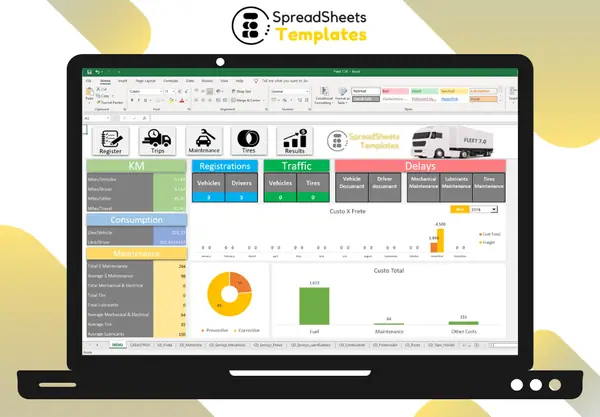
Fleet management software is often sold as a must-have. For many small and mid-sized fleets, though, a good spreadsheet covers the essentials for a fraction of the cost. Here’s an honest comparison to help you choose.
Side-by-side comparison
| Spreadsheet (Excel) | Fleet management software | |
|---|---|---|
| Cost | One-time (template) or free (build it yourself) | Monthly subscription, often charged per vehicle |
| Setup | Minutes with a template; hours to days from scratch | Onboarding, data import, training |
| Cost per km, fuel, maintenance | Yes, with formulas | Yes |
| Maintenance alerts | Yes, with conditional formatting | Yes, with notifications by e-mail or app |
| GPS / real-time location | No | Yes (with tracking devices) |
| Automatic data from vehicles (telematics) | No, data is typed | Yes |
| Mobile app for drivers | Limited | Usually included |
| Many users editing at once | Limited | Yes |
| Data ownership | Your file, on your computer | Stored by the vendor |
| Customization | Total | Limited to what the vendor offers |
When a spreadsheet is the better choice
- You have up to roughly 100 vehicles and one or two people managing them.
- Your main goal is cost control: fuel, maintenance, tires, cost per km.
- Drivers can hand in odometer readings and receipts, or someone types them in daily.
- You don’t want a recurring cost that grows with every vehicle you add.
When you need software
- You need real-time GPS tracking or route monitoring.
- You want data from vehicles (fuel used, idling, harsh braking) imported automatically.
- Many people across locations update records at the same time.
- Regulations require specific electronic logs in your country or industry.
The hidden costs on both sides
Spreadsheets cost time: someone has to type the data, and a poorly built file can produce wrong numbers. A tested template removes most of that risk.
Software costs more than the subscription: implementation, training, devices and the effort to export your data if you ever switch vendors.
A practical path
Many fleets start with a spreadsheet, build the habit of recording odometer, fuel and maintenance correctly, and only move to software when they need tracking or automation. Even then, the spreadsheet years aren’t wasted: they produce the clean history and the KPIs you’ll want any software to reproduce.
To see what a complete fleet workbook should include, read our fleet management spreadsheet guide and the 10 fleet KPIs for an Excel dashboard.
FAQ
Is Excel secure enough for fleet data? Yes, if you keep backups (for example, OneDrive or Google Drive) and protect the file with a password when needed.
Can a spreadsheet handle several branches? Yes, with a branch column and filters, as long as one person consolidates the data.
What’s the cheapest way to start? A ready-made template: you pay once and start recording on day one, without building formulas.